We run on what we build.
An attendance and leave-tracking product we built for ourselves — the same product discipline we sell to clients, applied in-house and used daily.
In short
Attendance and leave ran on a commercial HR suite that carried a subscription and never quite fit how the team actually works.
A mobile app that does attendance, leave and the approvals around them — and stops there. Shifts, leave types, the working week and the geofence are configured per organisation.
- Runs the whole team every working day
- Check-in is geofenced, and timestamps come from the server
- Corrections go through approval and stay visible in the record
The situation
A growing team needed clean attendance records, accurate leave balances, and a proper approval trail. That work sat in a commercial HR suite — one built for a much larger problem than the one we had.
The suite charged a subscription for a great deal of product we never opened. What we needed was narrow: who worked today, who is on leave, and an approval trail we could trust at the end of the month.
Fit was the sharper problem. Our shifts, our working week, our leave types and our grace periods never mapped cleanly onto the suite’s model, so the team kept adapting itself to the tool — and the record that came out the other side still needed interpreting before it was useful.
That left a choice between paying for a mismatch indefinitely, or building the narrow thing properly and depending on it.
What we built
OnTime is a mobile app the whole team uses every working day. It is deliberately not an HR suite: it covers attendance, leave and the approvals between them, and nothing else. Because it was built to run more than one organisation from the first version, everything that differs between teams — shifts, grace periods, leave types, the working week, the geofence — is configuration rather than code.
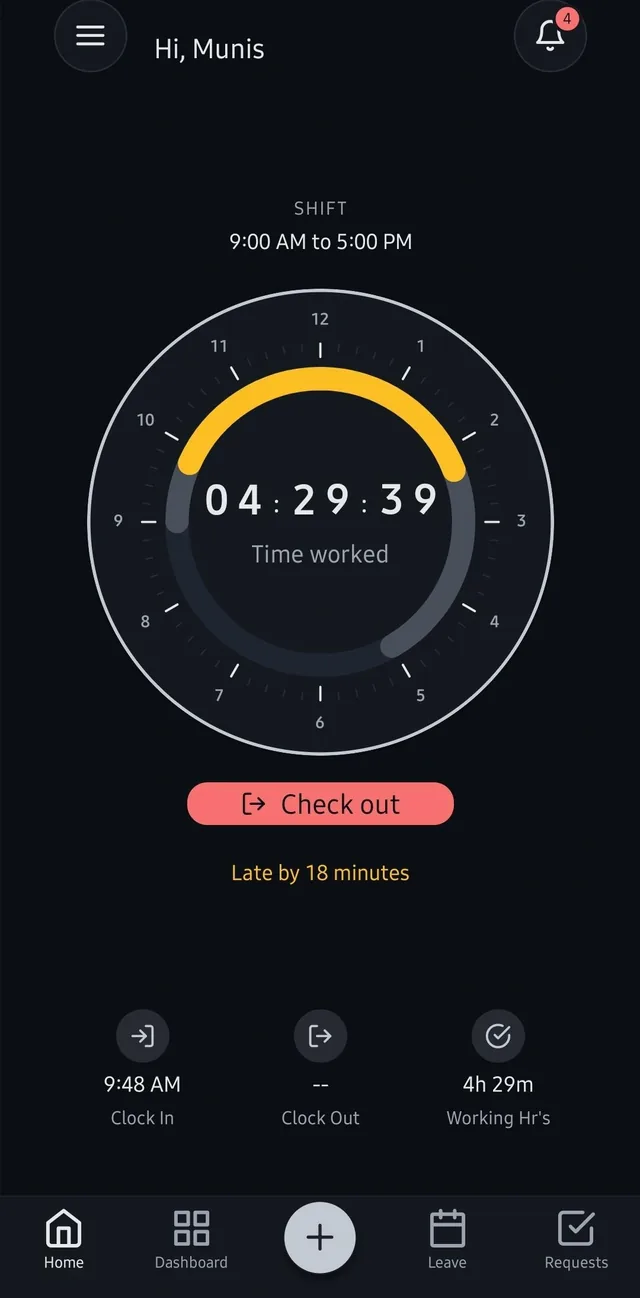
Shift-aware check-in and check-out
Employees are assigned a shift, and the day is clocked against it: a live count of time worked, and lateness measured against that shift’s own start time and grace period rather than one company-wide rule. An organisation can run several shifts at once, including one that crosses midnight.
Attendance fixed to the workplace
Check-in and check-out are geofenced to the organisation’s location, with the radius set by an admin. Outside it the action is blocked outright rather than recorded and queried later.
Regularization, so a missed punch is fixed openly
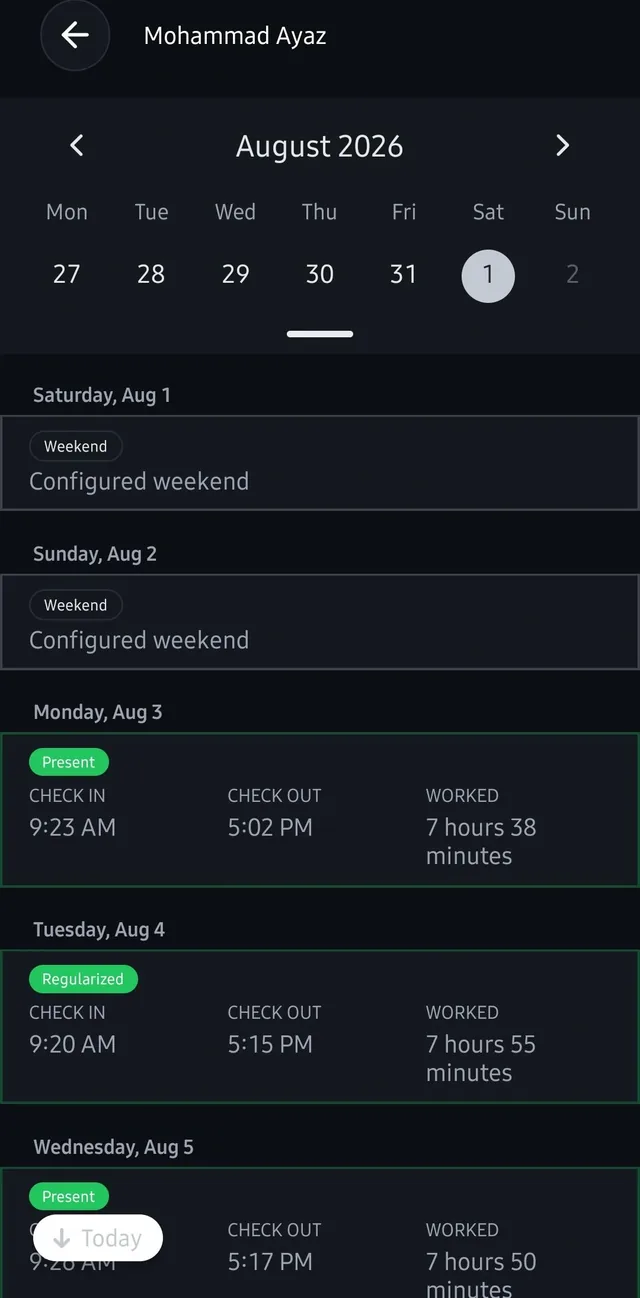
Attendance gets missed — a flat phone, a morning that starts somewhere else. Rather than let the record quietly go wrong, the employee submits the real times as a request and an admin approves or rejects it. The day is then marked Regularized, so the correction is visible in the history instead of silently overwriting it.
Leave shaped by the organisation
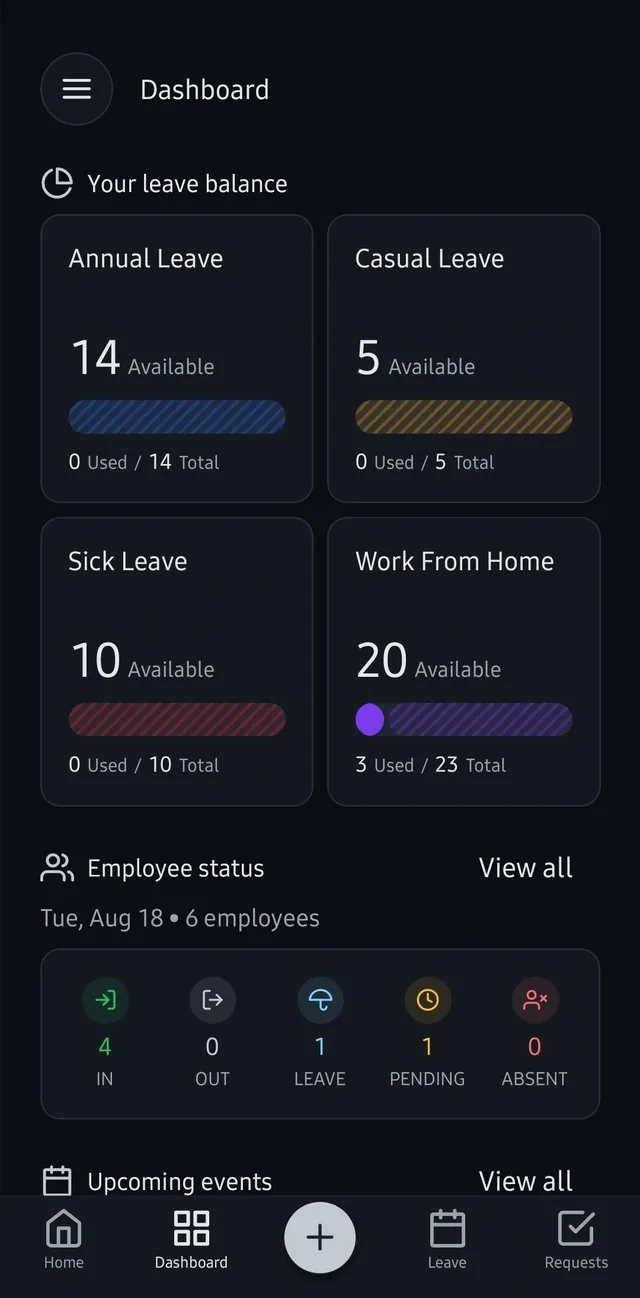
Leave types are defined per organisation rather than fixed by us — annual, casual, sick and work-from-home in our case — each with its own allocation. Everyone can see their own balance and what they have used without asking anyone.
Today, at a glance
One board shows who is in, who is out, who is on leave, whose request is still pending and who is unaccounted for. It answers the question a manager actually asks in the morning.
Attendance history and reports
A month view per employee, with each day carrying its state — present, regularized, weekend, leave — alongside check-in, check-out and hours worked. Half-days and overtime are calculated and recorded against the shift.
Reminders that arrive when they matter
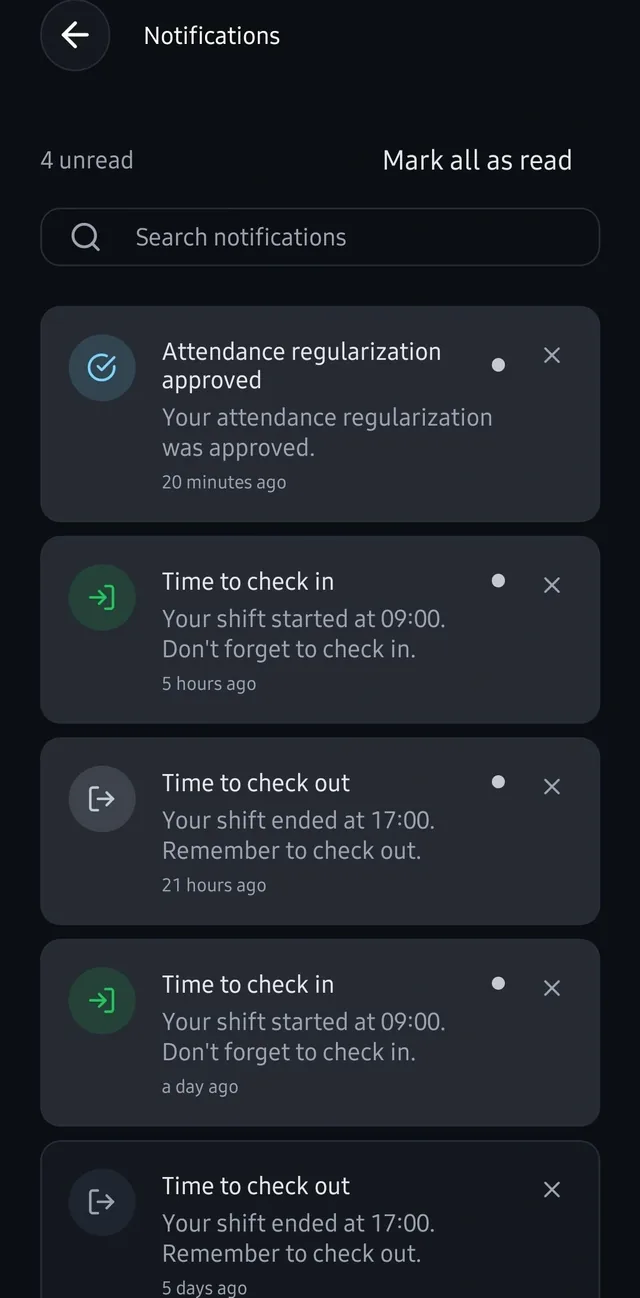
Push notifications at the start and end of an employee’s own shift, and when a request they are waiting on is decided. The reminders are the reason the record stays complete without anyone chasing it.
Set up by an admin, not by us
A new organisation signs up and its first user becomes its admin, who then creates employees, shifts, the working week, the holiday calendar, the leave structure and the company events everyone sees. Onboarding a second organisation is configuration, not a deployment.
OnTime runs internally every working day. Depending on it ourselves is the point — the team that maintains it is also the team it has to work for.
The stack
- React Native, one codebase on both iOS and Android. The app is the whole product — there is no web console, and administration happens in the same place as check-in.
- Firebase for auth, data and server-side logic. At this scale it removes an entire tier of infrastructure that would otherwise need maintaining for a tool that must not go down at 9am.
- Platform-native location services provide the device position that each geofence check is made against.
- Firebase Cloud Messaging, scheduled against each employee’s own shift rather than a fixed hour.
- Check-in and check-out timestamps are taken on the server, never from the handset. A device clock can be changed in a few taps, and an attendance record that trusts it is not a record.
What it changed
The subscription stopped
Attendance and leave moved off a paid HR suite onto something we own. The saving is real, but the more useful change is that the tool now fits the process instead of the process bending to the tool.
The questions stopped too
Balances, history and today’s status are visible to the person who needs them, which removed most of the asking-around the old arrangement generated.
Corrections are visible rather than silent
A missed punch is fixed through a request an admin approves, and the day carries a Regularized marker afterwards. The history says what happened, which is what makes it usable at the end of the month.
We are the ones who live with it
Daily internal use since the start of 2026 means every rough edge is one we hit ourselves, first thing in the morning, before any client would.
OnTime is not a product you can buy today. It was built to solve our own problem and it does that — but it was built multi-tenant from the first version, so a second organisation is a signup rather than a rebuild. If your team has the same narrow problem and is paying suite prices to solve it, that is a conversation worth having.
Questions
Is OnTime something we can buy?
Not off the shelf today — it was built for our own team, and it is distributed internally rather than published on the app stores. It was built to run more than one organisation from the start, though, so rolling it out to another team is a commercial conversation rather than a rebuild. If the problem sounds like yours, ask.
Why build it rather than buy an HR tool?
The problem was narrow — attendance, leave and the approvals between them — and the suite we were paying for was built for a great deal more than that. Cost was part of it; fit mattered more. Our shifts, working week and leave types never mapped cleanly onto the tool, so the record it produced still needed interpreting. Building it meant something shaped to how the team actually works, and a live example of our own delivery.
What stops someone checking in from home?
Two things. Check-in and check-out are geofenced to the organisation’s location, with the radius set by an admin, and outside it the action is blocked rather than recorded. And the timestamp is taken on the server rather than the handset, so changing a phone’s clock changes nothing. Work-from-home is handled as a leave type instead, applied for and approved like any other.
What happens if someone forgets to check in?
They submit a regularization request with the real times, and an admin approves or rejects it. The day is then marked Regularized in the record, so the correction is visible rather than silently replacing what was there — which is what makes the history trustworthy at the end of the month.
More case studies
NextRead
An AI reading-recommendation app that matches books to how a reader actually feels — designed, built, and published by WAM.
Read the story
AI email agent for inbound leads
An AI assistant working inside the team's existing inbox — reading enquiries, qualifying them, and booking meetings before anyone picks up the thread.
Read the story
Want something like this built?
Tell us what you're working on and we'll map what a first sprint would cover.